

CM Punjab Bewa Sahara Card
CM Punjab Bewa Sahara Card is an important social protection initiative designed to support widows across Punjab by offering financial assistance through a transparent and verified process. This program allows eligible women to register through the official systems of the Punjab Social Protection Authority (PSPA) and the Punjab Socio-Economic Registry (PSER), ensuring that assistance reaches only those who truly qualify for it. Because the government relies heavily on digital verification, applicants must provide accurate details, updated documents, and a valid mobile number to receive updates and complete the registration smoothly. The entire procedure has been designed to reduce middleman interference, bring clarity, and give widows a direct and official way to access their support.
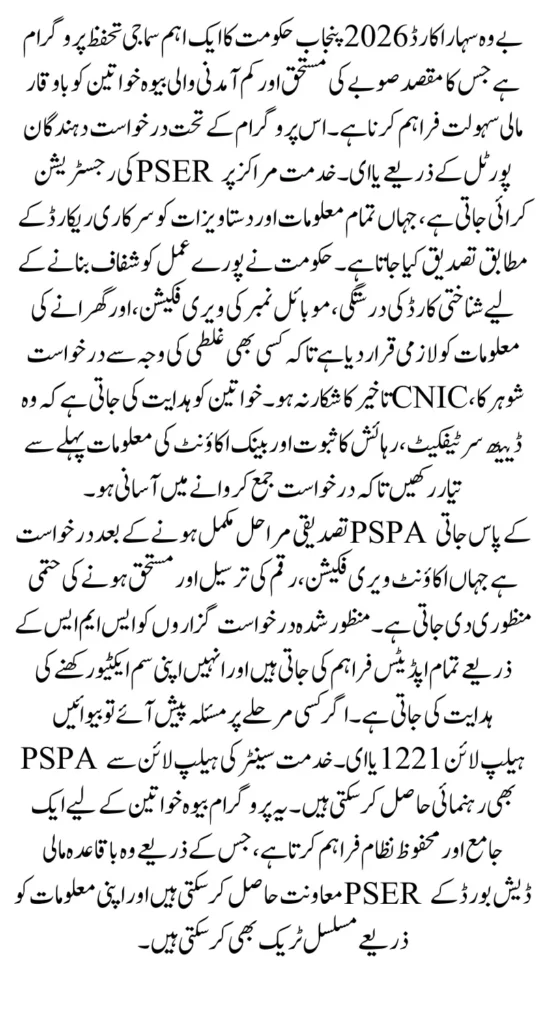
The program also helps widows who have been previously unable to access other assistance programs due to documentation issues or lack of guidance. With PSPA helpline 1221 and e-Khidmat support desks active across Punjab, applicants now have multiple safe and official channels to submit their details and correct mistakes in their profiles. Since different districts may follow slightly different rollout speeds, it is always recommended to confirm the latest stipend updates through PSER dashboard or PSPA helpline before visiting any office, ensuring that your trip is not wasted and your information is fully accurate.
You Can Also Read: Benazir Kafalat Alert Collect Your First Payment
Quick Summary
- Designed for widows living in Punjab
- Apply through PSER online or e-Khidmat in-person
- Required documents include CNIC, husband’s death certificate, proof of residence, and mobile SIM registered in applicant’s name
- Verification and approval handled by PSER and PSPA
- PSPA Helpline for official support: 1221
Eligibility Criteria for Bewa Sahara Card 2026
The eligibility criteria for the Bewa Sahara Card 2026 focus on identifying widows with genuine financial needs who require ongoing support. The provincial government uses PSER databases to filter out ineligible applicants and ensure that the assistance reaches only those households that fall under the defined social protection parameters. This includes confirming marital status, household income, residence, and any existing benefits the applicant may already be receiving. Because the system is interconnected with multiple government records, even small discrepancies such as an expired CNIC or an incomplete household profile may delay verification until corrected.
Another important requirement is that the widow should not already be receiving similar provincial-level support that overlaps with this program, as PSPA runs multiple schemes under its social protection umbrella. Additionally, widows must ensure that their mobile number is registered in their own name because PSER uses OTP verification at multiple steps of the registration process. If a mobile number mismatch occurs, the application can get stuck before submission, causing unnecessary delays. Applicants unsure about any eligibility requirement can call PSPA helpline 1221 for clarification before beginning the registration process.
You Can Also Read: BISP Update Bank Alfalah Agents Launch New Account
Eligibility checklist:
- Widow with an official death certificate of husband
- Punjab domicile or documented proof of residence
- Valid CNIC, not expired
- Low household income and not employed by a government department
- Not receiving overlapping provincial support
- Active mobile number registered in applicant’s name
Required Documents for Registration
To complete the registration process for the Bewa Sahara Card 2026, applicants must present authentic and complete documents that verify their identity, residence, income, and widow status. These documents help PSER match household information with government databases and ensure there is no mismatch between what is declared and what is stored in official records. Clear, readable, and updated documents reduce the chances of the application being returned for correction, which is a common issue faced by many applicants during the verification stage. Applicants should keep both the original and photocopies with them, especially when visiting e-Khidmat centers or PSPA help desks.
Digital copies are equally important for online applications. Scans should be clear, properly cropped, and within the file size limits mentioned on the PSER portal. Applicants using mobile phones to scan documents should ensure good lighting and avoid shadows or blur. When required, income affidavits must be prepared carefully as some districts may request them only when automated income verification fails. Bank or digital wallet details must match the applicant’s CNIC; otherwise, payment activation cannot be completed even after approval.
You Can Also Read: BISP Free SIM Facility Opens in Taunsa Network
Required documents list:
- CNIC (original + readable copy)
- Husband’s death certificate (certified or computerized)
- Proof of residence (utility bill, tenancy agreement, or domicile certificate)
- Income proof or affidavit, if asked
- Bank account or approved digital wallet details
- Mobile SIM registered in the applicant’s name
Document Summary
| Document | Why It’s Needed | Important Notes |
|---|---|---|
| CNIC | Identity verification | Must not be expired |
| Husband’s Death Certificate | Confirming widow status | Should be certified/official |
| Proof of Residence | Confirms Punjab residency | Must show current address |
| Income Proof | Only when system requests | Affidavit acceptable |
| Bank/Wallet Details | To activate payments | Must match CNIC name |
| Registered Mobile Number | OTP and SMS verification | Mandatory for PSER portal |
How to Apply Online (PSER Registration Steps)
Online registration through PSER is the fastest method for applicants who already have their documents scanned and ready. The PSER portal allows widows to create their profile, upload documents, and track their status from home without visiting any office. The system analyzes information such as household composition, income category, and residence through automated verification tools. For this reason, accuracy and consistency are extremely important. Even a slight mismatch in CNIC data, household size, or address can cause the application to remain in pending status until corrected.
Once the profile is completed, PSER will display updates inside the applicant’s dashboard. Widows may be asked to provide additional documents or verify missing information depending on district requirements. Because the system sometimes slows down during peak hours, applicants should try to upload documents during early morning or late evening for smoother submission. If someone faces difficulty, they can call PSPA helpline 1221 for immediate support or visit e-Khidmat Markaz for assisted online submission.
You Can Also Read: BISP Free SIM Distribution Correct Method
Steps to apply online:
- Go to pser.punjab.gov.pk and click “Register Now”
- Create an account using CNIC and mobile number
- Complete your household profile accurately
- Upload clear digital copies of required documents
- Track application status on the PSER dashboard
How to Apply In-Person (e-Khidmat / Tehsil Centers)
In-person registration is ideal for widows who have difficulty using smartphones or digital platforms. e-Khidmat Markaz centers are located across Punjab where trained staff help applicants complete their PSER registration using official systems. This method ensures that widows with limited digital access can still complete their applications with confidence. Staff members verify documents, enter details into the system, and ensure that the information being submitted matches the documents provided.
Applicants should carry all original documents for verification, as the staff may need to compare digital and physical copies. The center also assists with uploading documents if the applicant is unable to do so. If any correction is needed in CNIC details, they may guide the applicant to update the information through NADRA before submission. For further support or guidance about e-Khidmat services, applicants can call the official helpline 0800-09100.
You Can Also Read: BISP Beneficiaries Alert: Account Opening Activated
What to bring to the center:
- Original CNIC and photocopies
- Husband’s verified death certificate
- Latest utility bill or domicile
- Active mobile SIM for OTP verification
Verification, Approval & Payment Activation
The verification process begins as soon as the application is submitted. PSER performs the first layer of checks using household information, district records, death registrations, and income categorization. If the system detects any conflicting details, the application may be temporarily paused until corrected. For example, mismatched address information between CNIC and utility bill is a common issue that applicants should fix early. The verification process ensures that only eligible widows receive financial assistance under the provincial policy.
After PSER clears an application for eligibility, the case is forwarded to PSPA for approval and stipend processing. PSPA then reviews the payment details and links them to the applicant’s identity. Widows must ensure that their bank account or digital wallet is registered under their own CNIC, as third-party payment details are not accepted under program rules. Once payment activation is complete, beneficiaries receive SMS notifications on their registered mobile number. If any delay occurs, it is advisable to check the PSER dashboard or contact PSPA helpline 1221.
You Can Also Read: 8171 Tracking Portal 2026 To Check BISP Payment
Receiving Payments and Security Guidelines
After approval, payments are transferred through bank accounts or approved digital wallets, depending on district rollout. Applicants receive payment-related alerts through SMS, and must keep the same mobile number active throughout the program period. If the mobile SIM is lost or changed, applicants should immediately update their contact information on the PSER portal or visit an e-Khidmat center to avoid missing important notifications. Payment cycles may vary, so applicants should check their dashboard regularly for new updates or instructions.
Security is an important part of the Bewa Sahara Card system because all verification uses OTP and CNIC-linked details. Applicants should be careful not to share their personal information with anyone claiming to be a government agent. All official communication takes place only through PSPA helpline 1221, PSER dashboard, or e-Khidmat Markaz. Widows must ensure that they submit correct banking information, double-check their account numbers, and keep their CNIC updated to avoid interruptions in payment.
Security tips:
- Never share OTP codes with anyone
- Confirm bank account details before submission
- Keep CNIC updated to avoid verification failure
Common Issues and Quick Fixes
Many applicants face small but avoidable issues during registration. These problems usually occur due to incorrect document uploads, outdated CNIC information, or mobile SIM issues. Understanding these issues in advance helps widows avoid delays and complete their applications smoothly. For example, if the PSER portal does not load properly, the issue is often related to traffic on the website rather than a technical fault. Trying again during off-peak hours usually resolves the problem immediately. Similarly, if the system cannot verify income automatically, applicants may be asked to submit an affidavit.
Some widows also face issues because their SIM is not registered in their name, which causes OTP verification errors. This problem must be solved through telecom franchise before submitting the application. If the application remains pending for too long, widows should contact PSPA helpline 1221 and provide their dashboard tracking ID so the staff can review the case. If needed, visiting the nearest e-Khidmat center can also resolve technical or document-related issues more quickly.
Frequent problems & solutions:
- Portal slow → Try again during off-peak hours
- CNIC expired → Renew through NADRA before applying
- SIM not registered → Update ownership at telecom franchise
- Blurry or incorrect document upload → Upload a clear scanned file
- Application pending for long → Call PSPA 1221 with tracking ID
Tracking Status & Official Helplines
Tracking the application status is an essential part of the process because PSER updates the dashboard regularly whenever new verification steps are completed. Widows can log in with their CNIC and password to check whether their application has been accepted, needs correction, or has reached the approval stage. This eliminates the need to visit offices repeatedly and keeps the applicant informed throughout the process. Because all updates are digital, applicants should keep their mobile number active to receive notifications.
For any issues related to eligibility, document correction, stipend details, or delayed approval, applicants can contact the official helplines listed below. These helplines are designed to provide accurate government-approved guidance and help applicants resolve issues without relying on informal sources. Before calling, applicants should keep their CNIC and PSER tracking ID ready to speed up the support process.
Important helplines:
- PSPA helpline: 1221
- e-Khidmat helpline: 0800-09100
- PSER dashboard: Online status tracking
FAQs
1. What is the monthly stipend amount?
The stipend amount can vary depending on district rollout and government notifications. Applicants should always confirm the current amount through PSPA helpline 1221 or their PSER dashboard before visiting any office.
2. Can widows without digital skills apply?
Yes, e-Khidmat centers provide full assistance for registration, uploading documents, and verifying details. Staff members help applicants complete their PSER profile correctly.
3. Is income proof mandatory for every applicant?
Income proof is required only when the system cannot verify income automatically. In those cases, a simple affidavit may be accepted by the authorities.
4. Can payment be deposited into someone else’s bank account?
No. The bank account or digital wallet must match the applicant’s CNIC. Payments cannot be transferred to accounts belonging to another person.
5. How long does approval take after submission?
Approval time varies from district to district and depends on verification results. Applicants should monitor their PSER dashboard and call PSPA 1221 for updates if there is a delay.
Conclusion
The Bewa Sahara Card 2026 is a vital support system for widows in Punjab, offering financial security through a structured and transparent registration process. By preparing accurate documents, keeping CNIC details updated, and using official channels like PSER, PSPA helpline, and e-Khidmat Markaz, applicants can significantly reduce waiting time and avoid unnecessary complications.
This guide provides a complete overview of the steps involved, helping widows navigate the process confidently and efficiently. With proper documentation and timely verification, eligible beneficiaries can begin receiving support without difficulty and continue to track updates directly through their PSER dashboard.